Approve the parts that should survive
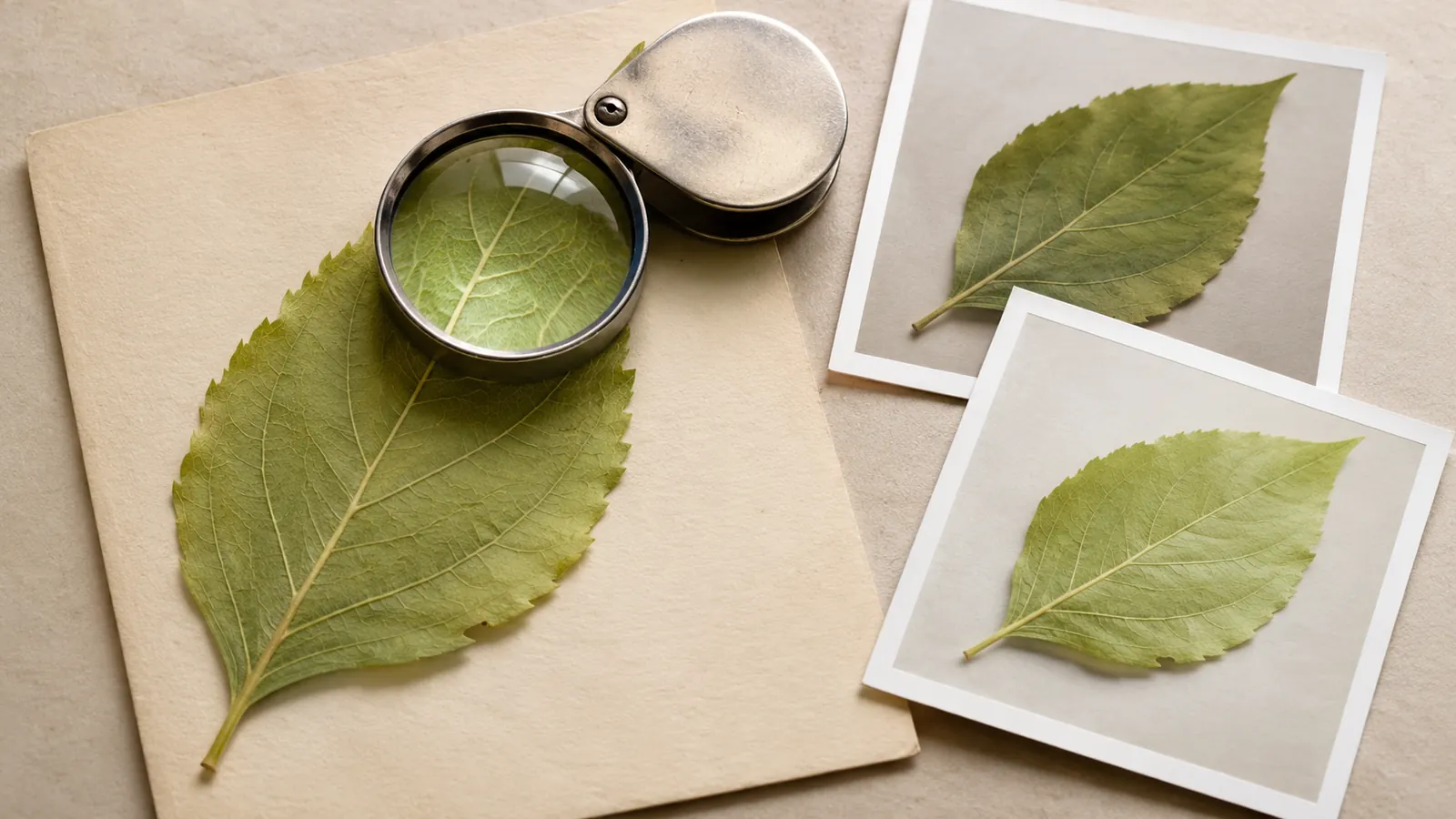
A science center wants a small illustration for a page about examining leaves. The drawing shows a pale green leaf lying on a cream card, with a hand lens above it. An editor asks for stronger light, then a closer lens, then a looping movement. By the end, the leaf has gained a different edge, the card has rotated, and the lens reveals veins that do not match the leaf underneath. Every individual image looks plausible. The sequence no longer describes one object.
OpenAI introduced Images 2.6 on November 4. The announcement says the release improves consistency across editing rounds and supports GIF creation. It also describes API image markup for directing local changes and separate quality and complexity controls. These are vendor descriptions, not evidence from testing conducted for this article. They make a useful production question more pressing: what must an editor verify when a tool makes revision easier?
The fictional leaf illustration is an invitation to look closely at a specimen, not a botanical identification guide or a record of an actual leaf. That distinction belongs in the creative brief. The proposed loop moves the hand lens across a drawing while preserving the specimen’s identity. It should suggest attention and observation without fabricating a scientific finding.
Before generating the first revision, record the features that must survive it. In this case: one leaf, its outline, its visible vein pattern, the card’s orientation, and the lens’s circular frame and handle. Those are invariants: things the editor has decided the sequence must keep. The lens position and the light can change under explicit instructions. This brief gives the reviewer a way to say whether an attractive new draft still belongs to the same project.
Source: OpenAI: Introducing Images 2.6 ↗ · Adobe: Create frame-based animations ↗ · W3C: Understanding Pause, Stop, Hide ↗
Separate a creative choice from a factual obligation
Not every detail needs the same kind of approval. The cream background is a stylistic choice. The number and shape of leaf lobes are part of the object being depicted. The location of a dark patch might help viewers follow the object across frames. Decide which details are free to vary and which carry meaning before a prompt creates a polished composition that everyone becomes reluctant to change.
For an introductory decorative image, a deliberately generic illustrated leaf may be enough. For a guide to identifying an actual species, the project needs an appropriate reference and a knowledgeable reviewer. The same image should not drift from the first role into the second because someone finds it convenient for a later page. Put the intended use with the asset so the next editor can see what was approved and what was never checked.
Write a sentence describing what the viewer should learn. Here it is: “Use a hand lens to pay attention to small surface details.” Avoid making the illustration claim that magnification creates new veins, reveals a particular disease, or proves an identification. If the lens window shows a larger section of the leaf, the visible pattern should correspond to that location. A playful style still benefits from an internally coherent relationship between the lens and its subject.
Choose a camera view that makes that relationship inspectable. A fixed overhead view lets the reviewer compare the lens window with the leaf below it. An oblique angle with dramatic reflections can be beautiful, but it may hide whether the pattern matches. For this job, visual clarity is more valuable than a complicated camera move. Save more expressive alternatives as separate concepts instead of mixing them into a sequence whose identity has already been approved.
Keep labels in an editable layer when the final page needs them. The illustration does not need generated lettering to convey its basic action. A human-authored caption can describe the image’s role and identify it as an illustration without making the artwork responsible for exact scientific terminology.
Make one revision answer one question
Create an approved starting image and give it a stable name. Save the brief, the chosen reference, the prompt, and the accepted file together. Then duplicate that state before asking for a change. A revision record can be simple: “Version two changes the direction of the soft shadow; leaf outline and lens position must remain as in version one.” The record matters because later review should compare the result with the version that actually supplied the instruction.
Keep the requested change small enough to judge. If one instruction changes the light, lens position, background, crop, and illustration style, a reviewer has to decide which of five differences caused a problem. Separate them into stages when those choices depend on each other. You can still explore broad alternatives early, before choosing the base. Once the project has a base, the question changes from “Which concept do we like?” to “Did this revision do the intended job?”
Place the new draft beside the approved state at the same displayed size. First inspect the intended change. Did the shadow move where requested? Then inspect the preserved details. Did the leaf tip change? Is the card still rectangular? Has the handle acquired another joint? Finish by checking the surrounding composition. An edit restricted in the prompt can still alter nearby textures or shift the balance of the scene.
If the result solves the lighting problem but changes the leaf, do not accept it as the new base and plan to remember the earlier shape later. Keep the approved state authoritative until the revision passes. Return to that state for another attempt or make the local repair in an ordinary editor. Otherwise each accepted compromise becomes the starting point for the next one, and the original identity becomes harder to recover.
Record rejected revisions briefly as well. A note such as “good shadow, changed serration” tells a colleague why an apparently finished file is not the one to use. This is especially useful when several people are reviewing asynchronously and the latest file is easy to mistake for the approved file.
When reviewers disagree, separate preference from the preservation rule. One may like the new leaf color more, while another notices that the stem moved. You can approve a new palette as an explicit decision and still reject a stem change. Write the decision into the brief so the next revision inherits a clear reference rather than an unresolved conversation.
Plan the motion before asking for frames
A loop needs a motion plan as well as a visual reference. For the hand-lens example, start with a resting pose, move a short distance across the leaf, pause, and return to the resting pose. Keep the movement modest enough that the leaf stays in view. The scene does not need to rotate or cut to a new angle to communicate inspection. A small deliberate action is easier to understand and easier to compare across frames.
Write down the intended states before production: rest, moving inward, closer inspection, moving back. Then decide what changes between neighboring frames. The lens center moves along a short path; its diameter remains constant; the leaf and card remain fixed. The apparent enlarged detail inside the lens follows its position. If that last relationship is too difficult to produce reliably, simplify the lens window rather than displaying an invented pattern.
A contact sheet puts all the frames in one view for structural review. Check the outline of the leaf from first to last, the relationship of the handle to the lens, and the placement of recognizable marks on the card. Number the working frames outside the artwork so an editor can identify an error without describing it as “the one just before the little jump.” Keep the numbering in the production files rather than relying on memory.
Review the return as part of the action. The last displayed state must lead sensibly back into the first. If the lens is moving left when the sequence ends and suddenly starts from the right, looping repeats the mismatch indefinitely. You might make the endpoint match the start, choose a deliberate back-and-forth sequence, or abandon the loop in favor of a single motion that stops. Pick the behavior for the intended viewing experience, not because a loop sounds more sophisticated.
Frame count is a production choice, not a quality guarantee. A small number can work for a restrained illustrated gesture. More frames can make motion smoother while introducing more opportunities for drift. Start with the fewest states that communicate the action, then add intermediate motion only where the actual draft needs it.
Inspect the sequence at more than one speed
A still-image review catches shape changes but can miss distracting motion. Play the draft at its intended speed, slow it down, and step through individual frames. Each view answers a different question. Normal speed tells you what a viewer experiences. Slow playback reveals irregular acceleration or a pause that feels accidental. Individual frames expose a lens handle that briefly detaches or a leaf mark that appears and disappears.
Look at the background, not just the moving subject. The scene can feel unstable if the card’s edge wobbles or the whole frame shifts by a few pixels. In the overhead example, compare the stationary corners and leaf stem. If everything moves together, the issue may be alignment between frames. If only the card changes shape, it is a content inconsistency. These are different repairs: aligning frames cannot restore a feature that has been redrawn differently.
A translucent overlay of a frame and the approved base can help identify movement outside the permitted area. Differences are a prompt to inspect, not an automatic rejection. The shadow is meant to change in a lighting revision, and magnification is meant to change the lens window in the loop. Use the brief to interpret what the comparison reveals. A numerical difference score alone would count intentional motion and accidental drift together.
After assembly, inspect the exported file rather than stopping at the editable preview. Adobe’s frame-animation guidance describes frame timing and looping as controls in the animation workflow. Whatever editor you use, confirm that the final asset has the intended order, durations, and repeat behavior. A contact sheet does not show that the export holds one frame too long or that a page displays the wrong first frame.
Check the asset at its intended display size and on the actual background color. Details that are obvious in a large editing window can become noise in a small article card. If the motion requires a tiny detail to be understood, consider a larger crop, a simpler graphic, or a static image with a clear caption. The purpose is to invite a closer look at the subject, not to make the viewer inspect a production flaw.
Deliver a still, a loop, and the reason to choose each
Treat the still image as a full deliverable. Choose a frame that makes sense without the motion, and supply a description appropriate to the page. The viewer should understand that a lens is examining an illustrated leaf even if the animation never plays. If the loop adds only atmosphere, the surrounding article must remain complete without it. If it communicates a step, provide that step in text as well.
Give the page a deliberate motion policy. W3C’s guidance for Pause, Stop, Hide explains the need for a user control when automatically starting moving content lasts more than five seconds alongside other content, with an exception for essential movement. For this decorative loop, a still-first presentation with an explicit Play control is a practical choice. Do not treat a short repeating file as though its individual cycle were the whole viewing duration. Consider what the page actually does when it repeats continuously.
Keep the approved package small and clear: the source image, the editable sequence, the final loop, the still alternative, and a note listing the accepted invariants. State that the image is an AI-assisted illustration and record the permitted editorial use. These notes let another creator reuse the work without silently turning a generic leaf into a species reference or confusing an illustrative loop with recorded footage.
Set a stopping rule for revisions. The asset is ready when it performs its intended job at the intended size, preserves the meaningful details, behaves correctly on the page, and has an adequate static alternative. Another attractive variation is not necessarily a reason to reopen an accepted sequence. If a new request changes the purpose or the specimen, begin a new version with a new brief.
The value of easier image editing is that you can make a correction without rebuilding every creative decision. Preserve that advantage by knowing which decisions have already been made. An editor should be able to point to a frame, name what changed, and explain why the change belongs. That habit turns a chain of plausible pictures into a coherent piece of communication.
Try this, then make it yours.
Take an existing illustration and name five features that identify its subject. Request one local change, compare the result with the approved base, and record any drift before accepting the revision.
Follow the signal.
Our reporting starts here. Practical suggestions are our analysis, and vendor performance statements are claims unless independently verified. We haven’t hands-on tested this release.
- OpenAI: Introducing Images 2.6 ↗ · 2026-11-04
- Adobe: Create frame-based animations ↗
- W3C: Understanding Pause, Stop, Hide ↗